IHK
Portfolio Project · Networking
IHK Final Exam · Sommer 2021
WLAN-to-LAN Bridge
Mobile Office Case
A Raspberry Pi 4 configured as a portable WLAN-to-LAN bridge, enabling LAN devices to access the internet via any WiFi network. Built and documented as an IHK IT-Systemelektroniker final exam project.
🎓
IHK Final Examination Project — IT-Systemelektroniker
This project was developed and submitted as the practical component of the IHK (Industrie- und Handelskammer) final examination for the IT-Systemelektroniker qualification in Sommer 2021. It includes a full project proposal, technical documentation, and a formal presentation, all available for download below.
🎯
The Problem
On-site client visits often require LAN-based devices (printers, PCs) to access the internet, but client locations only offer WiFi. A direct connection is not possible, an intermediary bridge is needed.
🔧
The Solution
A Raspberry Pi 4 configured as a portable NAT router: connects to any customer WiFi via wlan0, creates a local LAN via eth0 through a FRITZ!Box, and distributes DHCP to connected devices.
📦
The Deliverable
A compact "mobile office case", a self-contained unit deployable at any client site. WiFi credentials configurable via a web UI. No technical knowledge required from the end user on site.
Project Specifications
Tech Stack & Components
Every component selected for portability, reliability, and real-world deployment at client sites.
Hardware
Raspberry Pi 4
Raspberry Pi OS Lite · Headless deployment · wlan0 (WiFi in) + eth0 (LAN out)
Network Gateway
FRITZ!Box Router
Internal DHCP + DNS relay · AP mode for local LAN clients · NAT passthrough
Core Services
dnsmasq + iptables
DHCP server on eth0 · NAT routing · DNS forwarding · Custom iptables rules
Configuration UI
wifiWebUI
Web interface for WiFi credential management · No CLI knowledge needed on site
Automation
crontab Scripts
Auto-start bridge on boot · Custom bash scripts for routing and interface setup
Remote Management
mRemoteNG
SSH remote configuration tool · Used for headless Pi management and diagnostics
Network Design
Architecture Diagram
How traffic flows from customer WiFi through the Pi to the LAN devices.
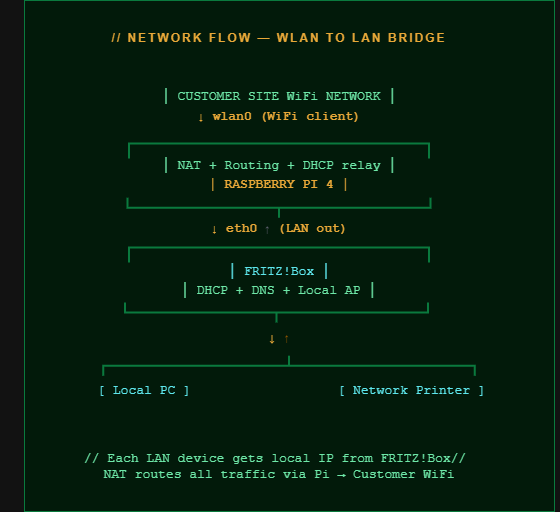
Network Architecture — WLAN to LAN Bridge via Raspberry Pi 4
Implementation
What Was Built
Five core components implemented and tested across 31 project hours.
🔀
NAT Routing & IP Forwarding
Configured iptables MASQUERADE rules for NAT between wlan0 and eth0. Enabled IP forwarding in the kernel to allow packet routing between interfaces.
📡
DHCP Server on LAN
dnsmasq configured as DHCP server on eth0. LAN devices automatically receive IP addresses, DNS, and gateway, fully transparent to the end user.
🖥️
WiFi Web Configuration UI
Deployed wifiWebUI, a browser-accessible interface for changing WiFi credentials on site. No terminal access needed, accessible from any connected device.
⚙️
Boot-Time Automation
All services start automatically on Pi boot via crontab and systemd. The bridge is operational within 60 seconds of powering on, no manual intervention required.
🧪
Testing & Validation
Full test suite: WLAN bridge stability, DHCP and NAT on LAN, remote login via mRemoteNG, and internet passthrough via FRITZ!Box, all documented in the IHK report.
📝
IHK Documentation Package
Complete project documentation: proposal, technical report, and presentation slides, submitted to and evaluated by the IHK examination board.
Project Timeline
Hours Breakdown
31 hours across 5 phases, as submitted to the IHK examination board.
14h
Implementation
Build + Config
Official Documentation
Downloads
All IHK project documents available for download, proposal, full technical report, and presentation.
📝
Project Proposal
Project idea, goals, planned structure, and estimated phases submitted to IHK
↓
📚
Technical Documentation
Full technical report, setup steps, configurations, test results, and conclusions
↓
📊
Exam Presentation
Final slides presented to the IHK board, summary, tech overview, and implementation phases
↓
⬡
GitHub Repository
Source code, config files, bash scripts, and wifiWebUI integration
→
What This Project Demonstrates
Skills & Competencies
🌐
Network Routing
NAT, IP forwarding, iptables rules, multi-interface routing between wlan0 and eth0
📡
DHCP & DNS
dnsmasq configuration, DHCP server on LAN, DNS relay and forwarding
🐧
Linux Administration
Raspberry Pi OS Lite, headless deployment, interface configuration, systemd
🤖
Shell Scripting
Bash automation scripts, crontab boot tasks, network interface startup sequences
🖥️
Web UI Deployment
wifiWebUI setup for non-technical on-site configuration, usability-first approach
🔧
Hardware Configuration
Raspberry Pi 4 as portable network appliance, FRITZ!Box AP mode, LAN topology design
📋
Technical Documentation
IHK-standard project proposal, full technical report, formal exam presentation
🎓
IHK Examination
Delivered under formal IHK exam conditions, IT-Systemelektroniker qualification, Sommer 2021
Explore More Projects
Browse the full system and network portfolio, or visit the GitHub repository for source code and configuration files.

Hey Claude,
Thanks a lot for the update.
Keep it coming brother
Hey Remba!
So great to hear from you, brother, brings back memories of the good old days in SA! 🙌
Thanks for the support, and trust me, more is definitely on the way. Let’s keep building and sharing!
Stay well and connected 💪
#TechRoots