
Homelab Project · VM 102 · Container Infrastructure
Docker Portainer
A dedicated container host on Proxmox for deploying self-hosted services as isolated Docker Compose stacks, with secure external access through a Cloudflare Tunnel and no router port forwarding.
01 / Overview
One host for multiple services.
The Goal
Build a dedicated Proxmox VM for deploying and managing self-hosted applications, with each service contained in its own reproducible stack.
What I Built
A hardened Ubuntu Server running Docker Engine and Portainer CE, with Compose stacks, persistent volumes, shared proxy networking, and isolated databases.
Why It Matters
The project demonstrates practical container operations, service networking, reverse proxying, secure publishing, and infrastructure documentation.
02 / Stack
Container platform & host.
03 / Architecture
From browser to container.
User browser
Requests a service on a dedicated munyakazi.org subdomain.
Cloudflare
Handles public DNS, HTTPS, TLS termination, and edge security.
cloudflared
Maintains an outbound encrypted connection from VM 102.
Nginx Proxy Manager
Routes each hostname to its container over the shared Docker network.
Target container
Serves the application while its database remains isolated.
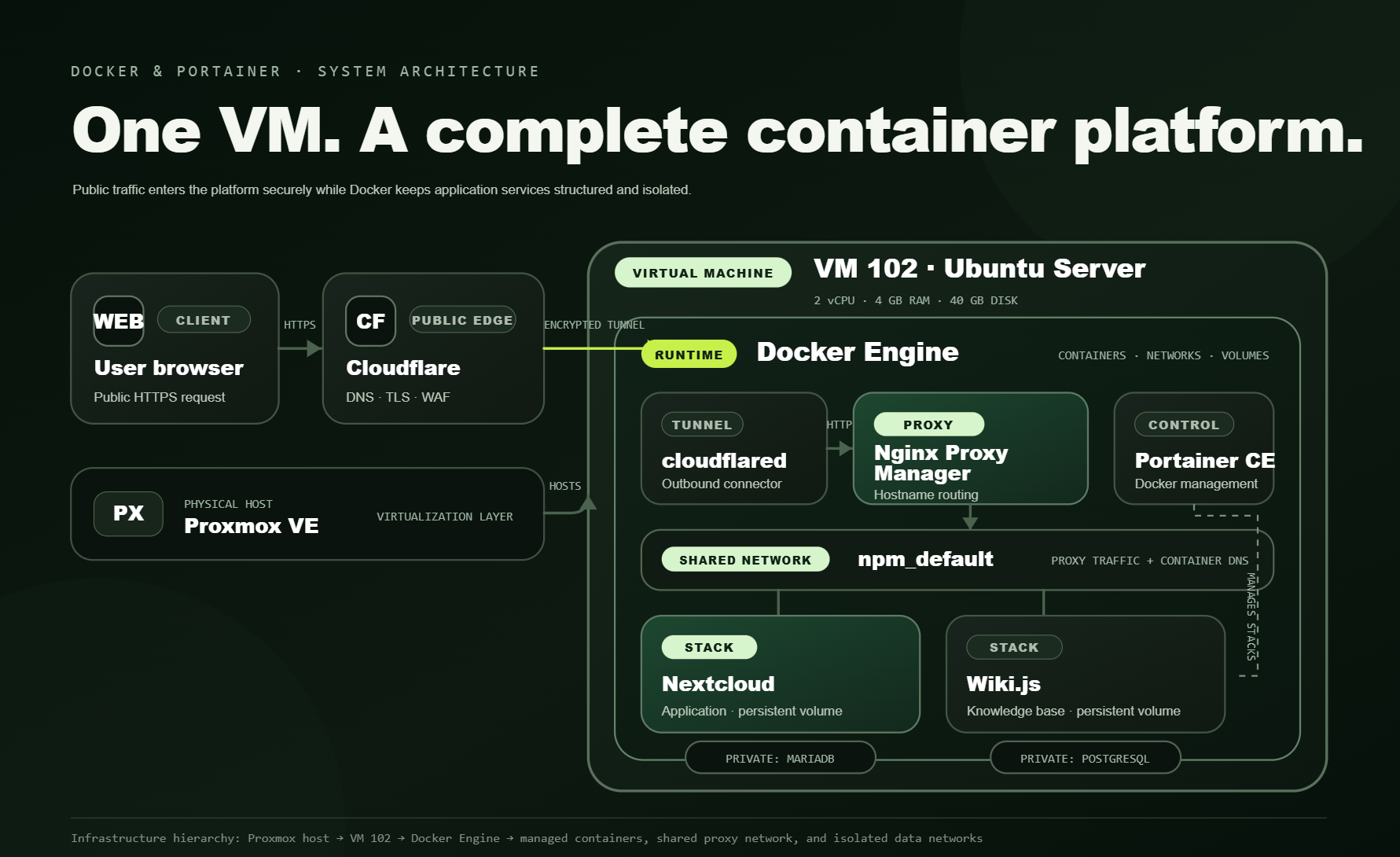
The tunnel originates inside the homelab, so the public request path requires no inbound router rule, public server port, or dynamic DNS update.
The tunnel originates inside the homelab, so the public request path requires no inbound router rule, public server port, or dynamic DNS update.
04 / Services
Compose stacks with clear roles.
Private cloud
Application and database deployed together, with persistent storage and the database kept off the public proxy network.
Technical knowledge base
Runbook-style homelab documentation served from Wiki.js with PostgreSQL on an isolated internal network.
Reverse proxy
Routes subdomains to containers by service name through the shared npm_default Docker network.
Secure external access
Publishes selected services through an outbound encrypted tunnel without exposing router ports to the internet.
05 / Implementation
Built as a repeatable platform.
Provision VM 102
Created an Ubuntu Server guest on Proxmox with two virtual CPUs, 4 GB RAM, a 40 GB local-lvm disk, and bridged LAN networking.
Install Docker Engine
Used Docker’s official apt repository, verified the runtime with hello-world, and granted the administrative user controlled Docker access.
Deploy Portainer CE
Ran Portainer as a persistent standalone container with access to the Docker socket for stack deployment, inspection, logs, and lifecycle management.
Design the networks
Connected public-facing application containers to npm_default while keeping MariaDB and PostgreSQL on private per-stack networks.
Deploy Compose stacks
Defined service configuration, named volumes, environment variables, restart policies, dependencies, and networks in version-controlled Compose files.
Publish through Cloudflare
Connected cloudflared to Nginx Proxy Manager, then mapped public hostnames to internal container names without opening inbound router ports.
Sanitize and document
Moved secrets into ignored environment files, published safe templates to GitHub, and documented the complete deployment in a Wiki runbook.
06 / Security
Expose services, not the host.
Cloudflare Tunnel provides inbound access through an outbound-only connection.
Database containers have no published ports and remain on isolated stack networks.
Real credentials stay in ignored environment files; GitHub contains sanitized examples.
TLS termination and web application firewall rules protect public service endpoints.
07 / Competencies
Skills demonstrated in practice.
Images, containers, volumes, restart policies, and lifecycle operations
Multi-service stacks and reproducible configuration
GUI deployment, monitoring, inspection, and logs
Bridge networks, service DNS, shared proxying, and isolation
Hostname routing through Nginx Proxy Manager
Zero Trust Tunnel, public DNS, HTTPS, and WAF controls
Secret handling, private databases, and minimal exposure
Sanitized repository plus a detailed operational Wiki
Built openly. Documented fully.
The public GitHub repository contains sanitized Docker Compose stacks and environment templates. The Wiki provides the full infrastructure overview and operational build notes.
VM 102 · Container Infrastructure
A practical platform for self-hosted services.
One virtual machine brings container deployment, persistent storage, service discovery, reverse proxying, encrypted ingress, and network isolation together as a working infrastructure system.
Back to Proxmox Homelab ↗