
Homelab Project · VM 100 · Remote Access
Self-Hosted WireGuard VPN
A VPN server on Proxmox that solves a real connectivity problem, remote access to a homelab that survives a second VPN running on top of it.
01 / Overview
Built to solve a real constraint.
The Goal
Reach my Proxmox homelab remotely from any network, including public WiFi where Avast SecureLine activates automatically and remains enabled for security.
What I Built
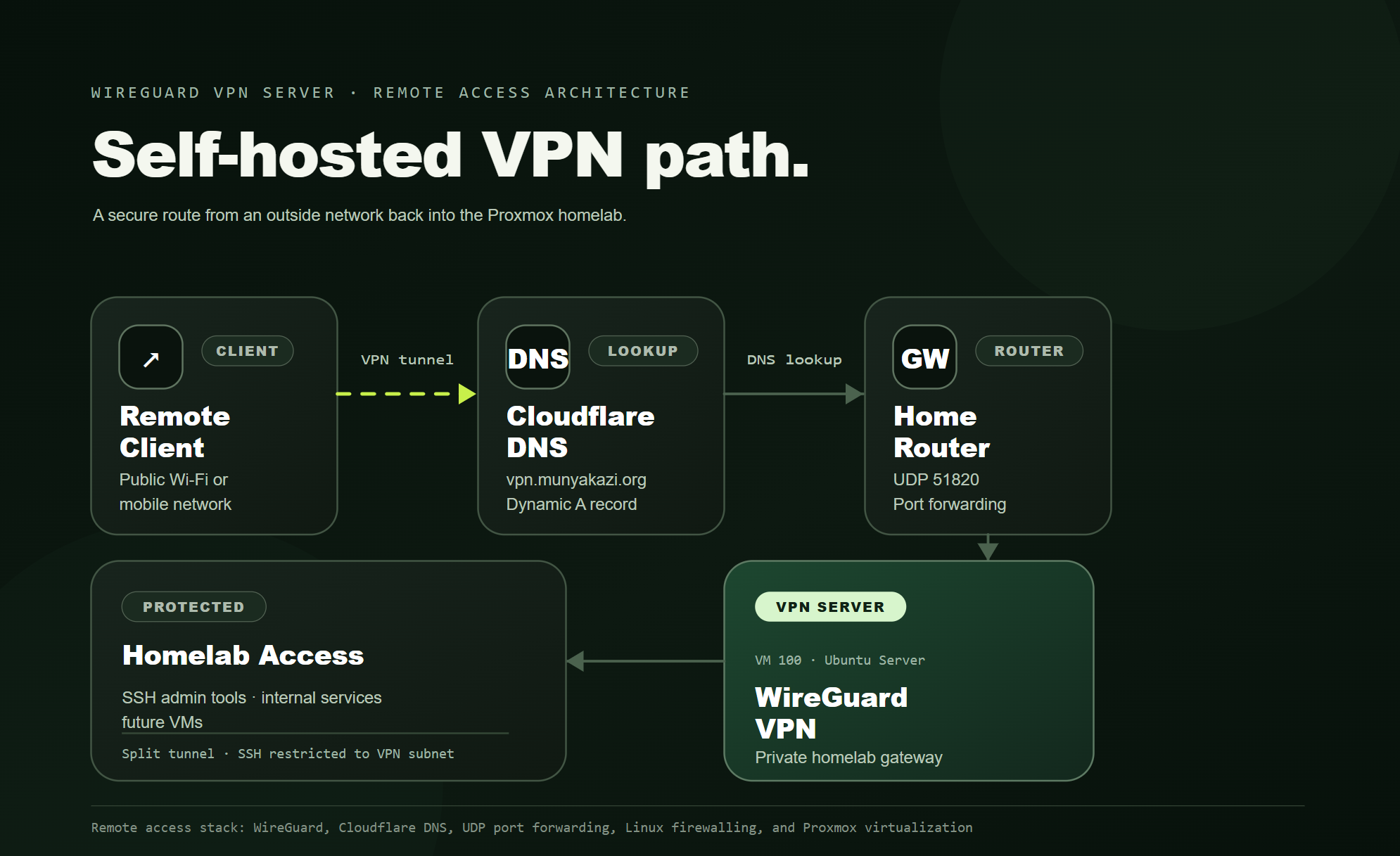
A dedicated Ubuntu WireGuard VM with split-tunnel routing, VPN-only SSH access, UFW hardening, and Cloudflare Dynamic DNS.
Why It Matters
Tailscale failed silently under a second VPN. Diagnosing the conflict and replacing it demonstrates real troubleshooting, not tutorial copy-and-paste.
02 / Stack
Tech stack & hardware.
03 / The problem
Why Tailscale wasn’t enough.
It worked perfectly at home, then failed silently during the first real test outside the network.
Two tunnels, no useful error.
Avast SecureLine auto-activates on public WiFi and silently blocked Tailscale’s tunnel. There was no warning and no split-tunneling option in that Avast version. With security taking priority over convenience, Tailscale was no longer viable as the primary access method.
A tunnel that does not compete.
WireGuard runs on a dedicated UDP port and uses explicit split-tunnel routes. It can operate beneath the existing public-WiFi VPN instead of fighting it for control of the complete network route.
04 / Implementation
From installation to field validation.
Install WireGuard on VM 100
Installed wireguard and wireguard-tools on Ubuntu Server 24.04, then generated separate server and client keypairs with wg genkey.
Configure the interface
Created /etc/wireguard/wg0.conf with a 10.10.10.0/24 private subnet, NAT masquerading, and kernel IP forwarding.
Open the firewall and port
Allowed UDP 51820 in UFW, enabled routed forwarding, and forwarded UDP 51820 from the router to VM 100.
Diagnose the routing failure
The handshake succeeded, but full-tunnel AllowedIPs = 0.0.0.0/0 broke local reachability. Restricting routes to 10.10.10.0/24 and 192.168.86.0/24 resolved it.
Lock SSH to the VPN
Removed the broad internet-facing SSH rule and allowed TCP 22 only from the WireGuard subnet, following least-exposure principles.
Automate Cloudflare DDNS
A Bash script checks the public IP every 10 minutes and updates the DNS-only A record only when the address changes.
Test under real conditions
Validated from outside the home network with Avast SecureLine active: DNS resolved, WireGuard connected, and devices across the LAN remained reachable.
05 / Competencies
Skills demonstrated in practice.
Keypairs, peers and split-tunnel routing
UFW, NAT and routed forwarding
Cloudflare API, Bash and cron
Ubuntu, systemd and sysctl
Root-causing a silent VPN conflict
VPN-scoped SSH and least exposure
Proxmox VM provisioning
Problem-to-resolution case study
Real code. Sanitized for GitHub.
The public repository will contain working WireGuard configuration templates, firewall rules, Cloudflare DDNS automation, and deployment notes, with private keys, tokens, public IPs, and account identifiers removed.
Result · Operational
Remote access that survives the real world.
The final system remains reachable through changing public IP addresses and while a second VPN protects the client on untrusted networks.
Back to top ↑