
Homelab Portfolio Project · Virtualization & Infrastructure

Building a Proxmox Homelab: From Bare Metal to Remote-Access VPN

A repurposed ThinkPad running Proxmox VE 9.2.2, hosting a growing set of virtual machines for hands-on infrastructure practice, Linux administration, Windows Server, containerized apps, and network security labs.

Explore the project

Built to evolve.
Documented as it grows.

pve-homelab UP 24/7
PROXMOX VEWIREGUARDLINUXACTIVE DIRECTORYDOCKERNETWORK SECURITY
01 / WHY THIS EXISTS

A lab built around real admin work.

This homelab exists to practice the same skills used in client and employer environments, virtualization, Active Directory, VPN infrastructure, container orchestration, and network segmentation, without needing production access to do it.

Every VM here solves a real problem or replicates a real-world admin task.

02 / THE HOST

One retired laptop.
A complete lab.

Bare-metal, headless, always on. The hardware is modest by design; the learning environment is not.

Hardware
ThinkPad
Repurposed from retired Windows 10 machine
Processor
i7-4810MQ
4 cores · 8 threads
Memory
24 GB RAM
Allocated across four VMs
Storage
500 GB SSD
Local LVM-thin storage
Hypervisor
Proxmox VE
v9.2.2 · community repo
Remote access
WireGuard
Cloudflare dynamic DNS
03 / PROJECT MAP

Four services.
One evolving system.

Project progress50%
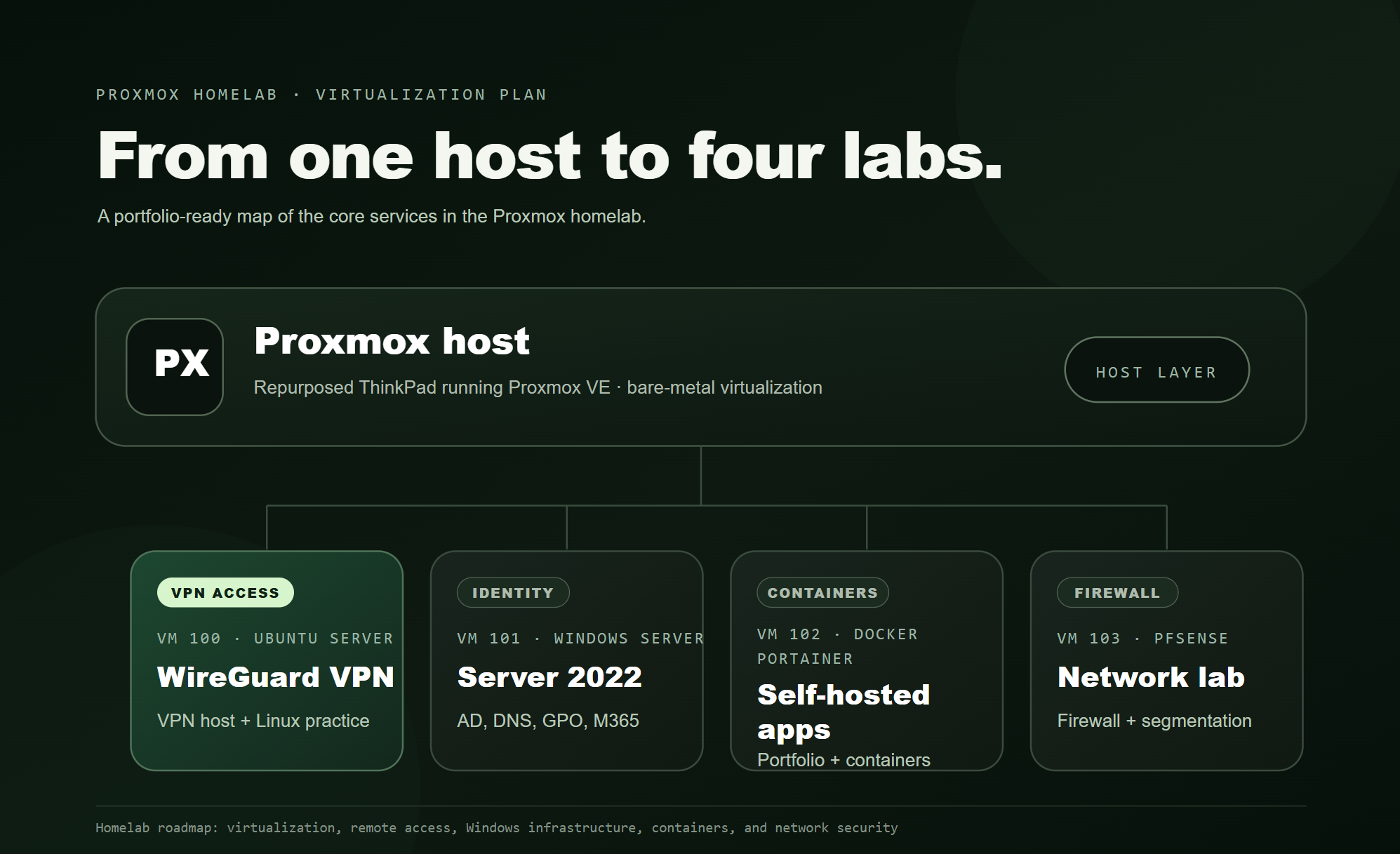
Proxmox homelab plan showing VM 100 WireGuard, VM 101 Windows Server, VM 102 Docker Portainer, and VM 103 pfSense
PlannedVM 101

Identity & access

Windows Server 2022

Active Directory, DNS, GPO management, and Microsoft 365 hybrid practice.

Next in line
LaterVM 103

Network security

pfSense

Dedicated firewall and network segmentation lab.

On the roadmap

Homelab portfolio · Project index

The lab is never really finished.

This page frames the homelab as a practical infrastructure portfolio: one host, multiple service areas, and focused writeups that show how each system is designed, configured, and secured.

Back to portfolio